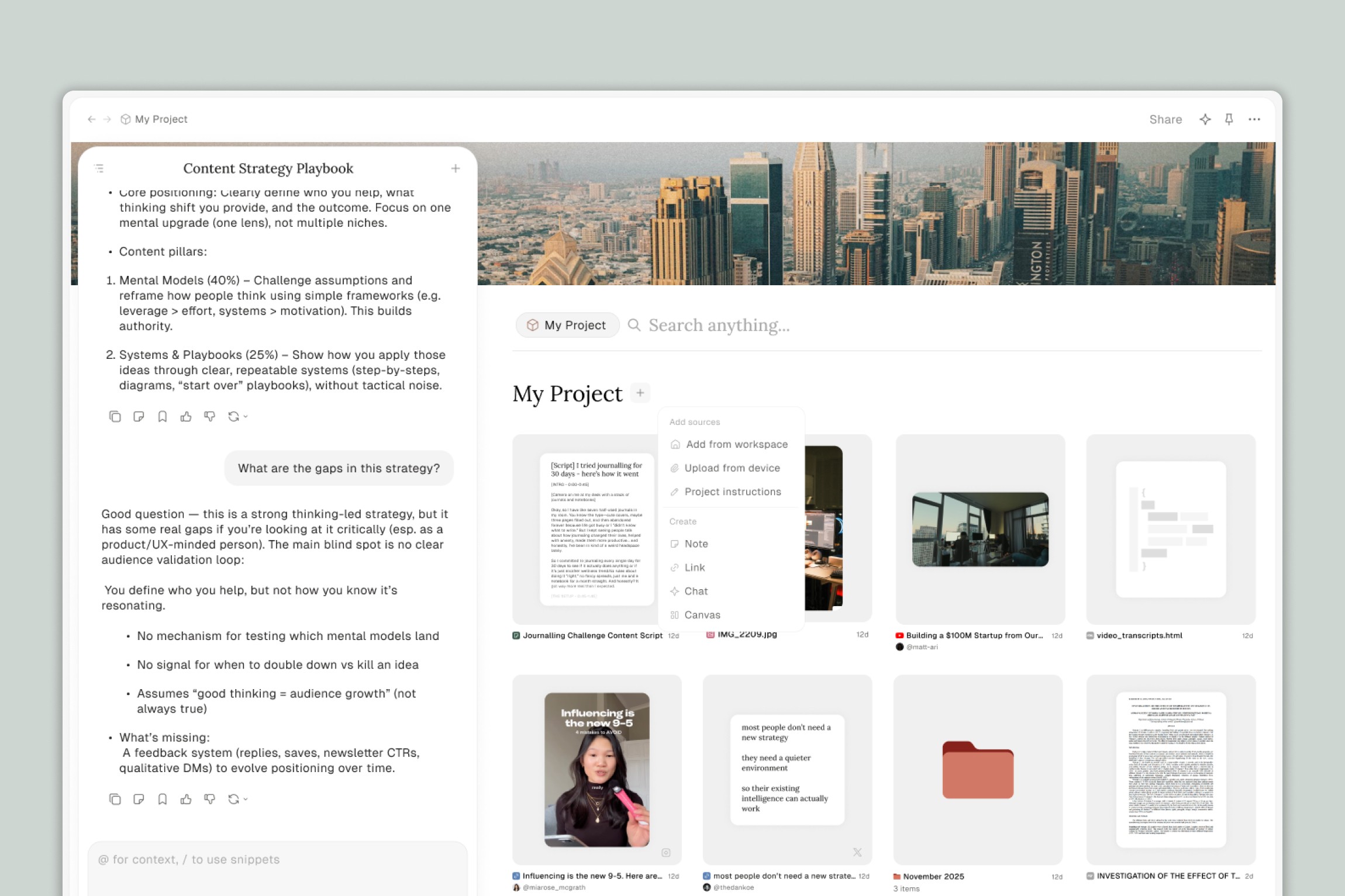
Not sure what to use Projects for? This article walks through concrete examples for writers, content creators, business owners, and anyone who wants to get more done with their files and AI working together.
The key idea behind every use case is the same: instead of starting from scratch in every chat, you give the AI the full context of what you're working on — your files, your style, your goals — and then collaborate with it across multiple conversations.
For Writers & Bloggers
Build a Writing Assistant That Knows Your Voice
Upload 5–10 of your best past articles, along with any brand guidelines or style notes. The AI learns how you write — your tone, your structure, your vocabulary — so that when you ask it to help draft or outline new content, the output actually sounds like you, not a generic AI.
What to add to the project: Past blog posts, newsletters, style guides, audience notes, any "about me" copy.
What to ask: "Based on my past writing, outline a blog post about [topic]." Or: "Draft an intro paragraph for this article in my usual tone."
Research and Write in the Same Place
If you're working on a long-form article, you probably have a pile of sources — links, PDFs, notes, maybe a few YouTube videos you watched for background. Add all of it to a Project. Then chat with the full collection while you write.
What to add: Research PDFs, saved links, YouTube videos, interview transcripts, rough notes.
What to ask: "Summarize the key findings across these three papers." Or: "What are the most interesting quotes from this interview that relate to [topic]?"
Repurpose Content Across Platforms
Take a long-form piece — a blog post, a podcast transcript, a video script — and use the project to spin it into multiple formats without losing the core message.
What to add: The original content, plus any platform-specific guidelines (character limits, tone preferences for each channel).
What to ask: "Turn this blog post into 5 LinkedIn posts." Or: "Write a Twitter thread based on the key points from this article."
For YouTubers & Video Creators
Script Writing With Research
You've watched a bunch of videos, saved some articles, and have a rough idea for your next video. Drop everything into a Project and use it as your writing room.
What to add: YouTube video links (which Eden can save and transcribe), article links, rough outlines, notes.
What to ask: "Based on these sources, write a 10-minute video script about [topic] with a strong hook." Or: "What are the 3 most compelling arguments from my research that I should lead with?"
Create Clips From Long-Form Videos
Save a YouTube video to your workspace and add it to a project. Then ask Eden AI to identify the most impactful moments and create short clips.
What to ask: "Find the most impactful parts of this video that are no longer than 45 seconds. Then create clips out of the 3 best ones and add them to a 'Clips' folder."
Note: This is an advanced workflow — it may not be perfect every time. If you run into issues, let us know!
Build a Podcast Research Hub
Working on a podcast or video series? Create a project for each season, series, or topic area. Add guest research, episode outlines, and past episode transcripts so the AI has full context.
What to ask: "Find 10 podcasts that [specific person] appeared on and save them to a 'Guest Research' folder." The videos will download and transcribe automatically, giving you a searchable library of source material.
For Business Owners & Teams
Create SOPs and Documentation
You know how your business runs, but it's all in your head (or scattered across random docs). A Project lets you dump everything you know — processes, guidelines, past emails, templates — and ask the AI to turn it into structured documentation.
What to add: Existing process notes, email templates, onboarding docs, any informal "how we do things" documents.
What to ask: "Based on everything in this project, create a Standard Operating Procedure for [process]." Or: "Write an employee handbook section covering our customer service guidelines."
Build and Maintain Brand Guidelines
Upload your current brand assets — logo usage rules, tone of voice docs, approved messaging, past marketing materials. Then use the project to create new materials that stay on-brand, or to update your guidelines as your brand evolves.
What to add: Existing brand docs, sample marketing copy, social media guidelines, customer personas.
What to ask: "Create a brand voice guide based on these materials." Or: "Write 5 product descriptions that match our brand tone."
Email Sequences and Marketing Copy
Add your product information, customer personas, and examples of past emails that performed well. The AI can draft new sequences, suggest subject lines, or help you A/B test variations — all grounded in your actual brand context.
What to add: Product details, past email campaigns, audience research, conversion data if you have it.
What to ask: "Draft a 5-email welcome sequence for new customers based on our brand voice and product info." Or: "Write 3 subject line variations for this promotional email."
For Students & Researchers
Literature Review and Synthesis
Upload multiple papers, articles, or textbook chapters to a project. Chat across all of them to find connections, contradictions, or gaps in the research.
What to add: PDFs of research papers, article links, your own notes, assignment briefs.
What to ask: "Compare the methodologies used across these three studies." Or: "What are the main areas where these authors disagree?"
Study Companion
Create a project for each course or subject. Add lecture notes, textbook sections, and past assignments. Use it as an interactive study tool that knows your full curriculum.
What to add: Lecture notes, textbook chapters, assignment prompts, past work.
What to ask: "Quiz me on the key concepts from Chapter 4." Or: "Explain [concept] using examples from my lecture notes."
For Anyone: Workspace Organization
Set Up a Digital Organization System
Tell Eden AI about who you are, what you do, and how you work. Then ask it to create a folder structure — like the PARA method (Projects, Areas, Resources, Archive) or any other system — tailored to your needs.
What to ask: "I'm a freelance designer who works with 5–10 clients at a time. Create a PARA folder structure for my workspace." Then, as you add new files: "Organize this file into the right folder based on my system."
Automate File Organization
As you create or upload new files, you can ask Eden AI to sort them into the right place. Over time, your workspace stays clean without you having to manually file everything.
What to ask: "I just uploaded 15 files. Organize them into the appropriate folders based on their content."
Tips for Getting the Most Out of Projects
Be specific with your prompts. Instead of "write me a blog post," try "write a 1,000-word blog post about [topic] in my usual conversational tone, with 3 main sections and a call to action at the end." The more detail you give, the better the output.
Upload your best work as examples. The AI learns from what you give it. If you want output that matches your voice, give it examples of your voice — your best articles, your favorite emails, your most effective marketing copy.
Use multiple chats within a project. Don't try to do everything in one conversation. Use separate chats for research, outlining, drafting, and editing. This keeps things focused and makes it easier to revisit specific conversations later.
Let the agent do the legwork. If you need files pulled in, folders created, or information gathered from the web, ask Eden AI to handle it. That's what it's there for.
Start small and experiment. You don't need to set up the perfect project on day one. Start with one use case — maybe outlining your next blog post or organizing a folder — and expand from there as you get comfortable.
Thank you.