Changelog
#0008
We got the message. You loved canvas.
Over the past 2 weeks, we’ve had more conversations about it than we’d like to admit. We actually wrote out an email explaining why we removed it, but it was almost impossible to get all of the thought process to fit into one coherent email, even when we asked AI to synthesize it together.
Eventually, we realized that was a core feature that differentiated us from everyone else. It also represents the intentional creative process which is difficult to replicate in a chat interface.
That said, canvas is coming back. We’ve rebuilt it, and so far it’s faster, better, and more capable with things like video generation.
We will leave that for an email that will come very soon, along with another feature that you won’t see many other apps have. The next few weeks will be pivotal for Eden, to say the least.
Oh, and we just increased credit and storage limits on each tier! This is not reflected on our main pricing page yet, as we plan to simplify our prices more for new users (don't worry, nothing will change on your end, we're just making it so the prices are more palatable, like $20 instead of a random $17 - credit usage and price per credit will stay the same).
In short, for you, we simplified the credit system a bit more. 1 credit = $0.01 of AI usage. Now each tier has more or less as many credits as they pay for. Starter tier has 1500 ($15 worth), Creator has 3000 ($30 worth), Pro has 8500 ($85 worth). In other words, we now offer AI usage at cost. You won't notice much of a difference in how slow or fast credits are consumed, but you have more.
In terms of storage limits, we're bringing back the previous amounts. Starter has 100gb, Creator has 500gb, Pro has 2tb.
These changes are rolling out as we speak, so if you don't see them immediately, you will see them within the next day.
Of course, new features and more usage is great, but bug fixes are arguably more important, so here is everything that’s went in the past few days and weeks.
Note: there are a number of you who are having difficulty uploading files. This isn’t a simple fix, and usually the issue stems from the location you reside. Unfortunately, uploads will gradually get better as we have servers that support more regions.
Onto the fixes, improvements, and changes (these are not all of the changes, as some fixes were done on the fly and not tracked):
What's New
Improved Tables — You can resize columns by dragging the handle between them, add and delete rows/columns from a new control menu, navigate between cells with arrow keys, select a range of cells by clicking and dragging, and cut, copy, and paste cell content. There's also a right-click context menu that gives you quick access to all table actions.
.docx and CSV Support — Eden now supports .docx and CSV files. You can create and edit Word documents directly in your workspace, and CSV files are now recognized as a file type you can upload, search, and reference in your projects. You can also view the version history of your .docx files, so you can always roll back to a previous version if you need to.
Type Filter Chips in Search — You can now filter your search results by file type (see: the filter chips under the search bar). These should help navigate by item type rapidly, and will allow us to simplify the sidebar soon, making Eden less chaotic than it needs to be.
Social Media Embeds in Notes — Paste a link from Twitter, YouTube, or Instagram directly into a note, hit "Tab," and Eden will embed the content automatically.
Folder-Scoped Chat Sidebar — There's a new chat sidebar scoped to the folder you're in, making it easier to keep your conversations organized and on topic.
Improvements
Project Navigation — We've standardized how you navigate within projects. Whether you're opening a chat, an item, or a folder from the command menu, a context menu, the grid, or your recents, the behavior is now consistent.
Right-Click Context Menu in Editor — A new right-click menu gives you quick access to cut, copy, paste, paragraph styles, lists, text styles, and more.
Collapsible Headings — You can now collapse headings in your notes to hide the content underneath, making it easier to navigate long documents.
Editable Comments — You can now edit your comments in notes. Resolved comments are also hidden automatically, removing their highlights from the note text.
Inline Backlinks — Backlinks are now inline so they no longer break awkwardly to a new line.
Heading Navigation — Jump between sections of your notes using the new heading navigation.
Strikethrough Shortcut — The shortcut for strikethrough has been updated to Cmd+Shift+X.
Improved Comments Sidebar — The comments sidebar has been redesigned with an animated panel, refreshed styling, and profile-based author identity.
Optimistic Trash Restore — Restoring items from the trash now happens instantly, and the "Show location" option navigates you directly to where the item was restored.
Animated Folder Cards in Projects — Folders in your projects now have a new animated card UI.
Click to Create New Line — You can now click on the empty space at the bottom of a note to start a new line.
Renaming a Note Renames the File — When you rename the title of a note, the file name updates automatically.
Better Search Ranking — We've improved our search ranking algorithm to be more title-aware, so the most relevant results surface first.
Bug Fixes
Fixed a bug that caused the chat input placeholder to flicker.
Fixed a bug with not being able to edit snippets in the new save as snippet markdown editor
Fixed an issue where the placeholder would show up multiple times in the chat input.
Resolved copy/paste issues from chat responses and other applications.
Fixed the bubble menu jittering when close to the edge of the browser window.
Fixed a bug with deleting bold, italic, or underlined text in the editor.
Fixed several bugs causing buggy note behavior, including random formatting changes and auto-scrolling.
Fixed an issue where the cursor would jump to the note title while writing.
Fixed text lines overlapping when pressing return.
Fixed arrow key cursor navigation not working correctly.
Fixed toggle lists not collapsing properly.
Fixed several markdown formatting errors.
Fixed a blank screen issue for some users.
Fixed image handling bugs, including a new line appearing above an image when pressing enter, and the skeleton loader jumping out of the screen.
Fixed table jittering and stabilized table rendering.
Fixed nested bold/italic markdown not being preserved after reload.
Fixed table column widths not persisting on reload.
Fixed menus getting clipped in the editor.
Fixed chat autoscroll behavior on Safari and non-Chrome browsers.
Fixed folder uploads not preserving folder structure.
Fixed cascading folder deletion where nested items wouldn't delete.
Fixed pane resize drag continuing after releasing the mouse.
That's it for now. We hope you enjoy the new features and improvements!
The next email will surprise you.
# 0007
Introducing Projects & Agents
We have a lot to cover in this update.
The new projects feature
The new agentic functionality
AI credit information (important for those asking)
Markdown support and minor expected bugs to be resolved
Various details throughout that make a difference in Eden.
On the topic of AI credits - we've decreased the price of credit add-ons and have made them available to every tier, not just the pro tier.
Why?
Because some people don't need the extra storage of a larger tier which impacts the price of each tier. The credit add-ons are priced based on pure credits. The tiers themselves have storage and file processing baked in (link and file downloads, tagging, transcription, and frame analysis.
So, if you ever need more credits, even on the Starter or Creator tier, you can go to Settings > Billing > Manage AI Credits to do so.
We'll talk about credits more soon, but here are the new features and what you need to know:
New: Projects
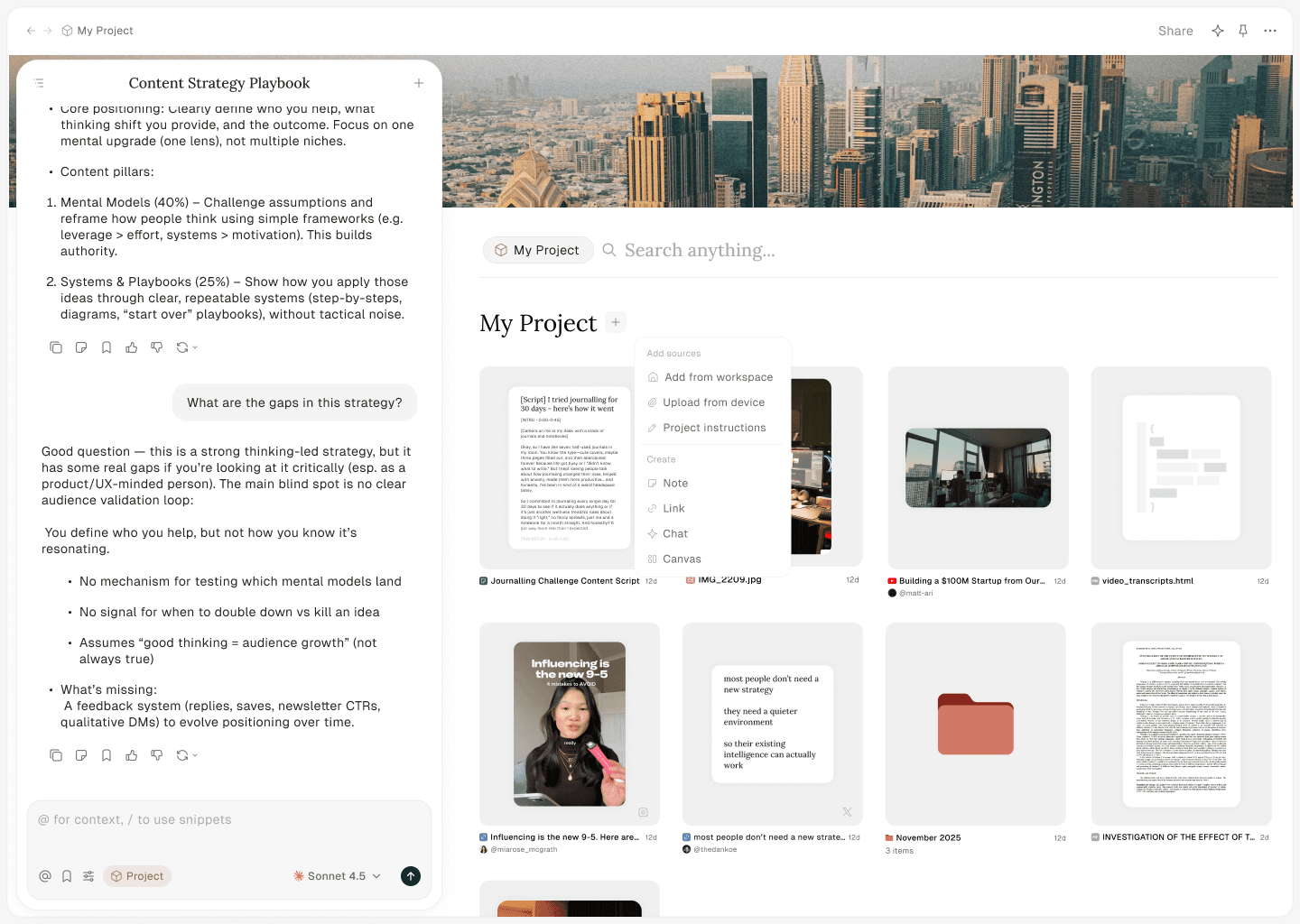
Imagine you're working on a newsletter, article, video script, or some other creative project. You have a bunch of sources you're searching through for ideas... YouTube videos, PDFs, old content, and more.
In the Projects feature, you have a space for files and a place to chat. You can have multiple chats within a project, allowing you to keep them organized and on topic. You can add all relevant files for the project you're working on and then chat with all of them (rather than @ mentioning each one every time you start a new chat). The AI searches for information across your project to give you the right information.
How is this different from other AI project features? Well, you have access to your entire drive and workspace. Second, you can open the files directly in the project. So, if you're writing a script or document, you can edit it directly while you are chatting rather than letting AI take full control. Third, the agent, as we'll discuss, is built in so you can ask it to research, grab links, or pull in files from your workspace that match what you're working on.
A few examples to get ideas of projects you can start:
Add your past content, templates, and guidelines to a project and chat with it to create outlines and content
Have something you want to create, like an article or video script, and add your outline, YouTube videos, summaries, or other research - then chat with them all as you write the article or script.
Add or create information about your business, then chat to create SOPs, handbooks, email sequences, documentation, and more.
Add brand guidelines, support documentation, and more then ask the chat to update them or create more.
In short, when you are working on a project, consider using the project feature. Let your workspace be the place where you store files and let projects be the place you do the work.
New: Agentic Functionality
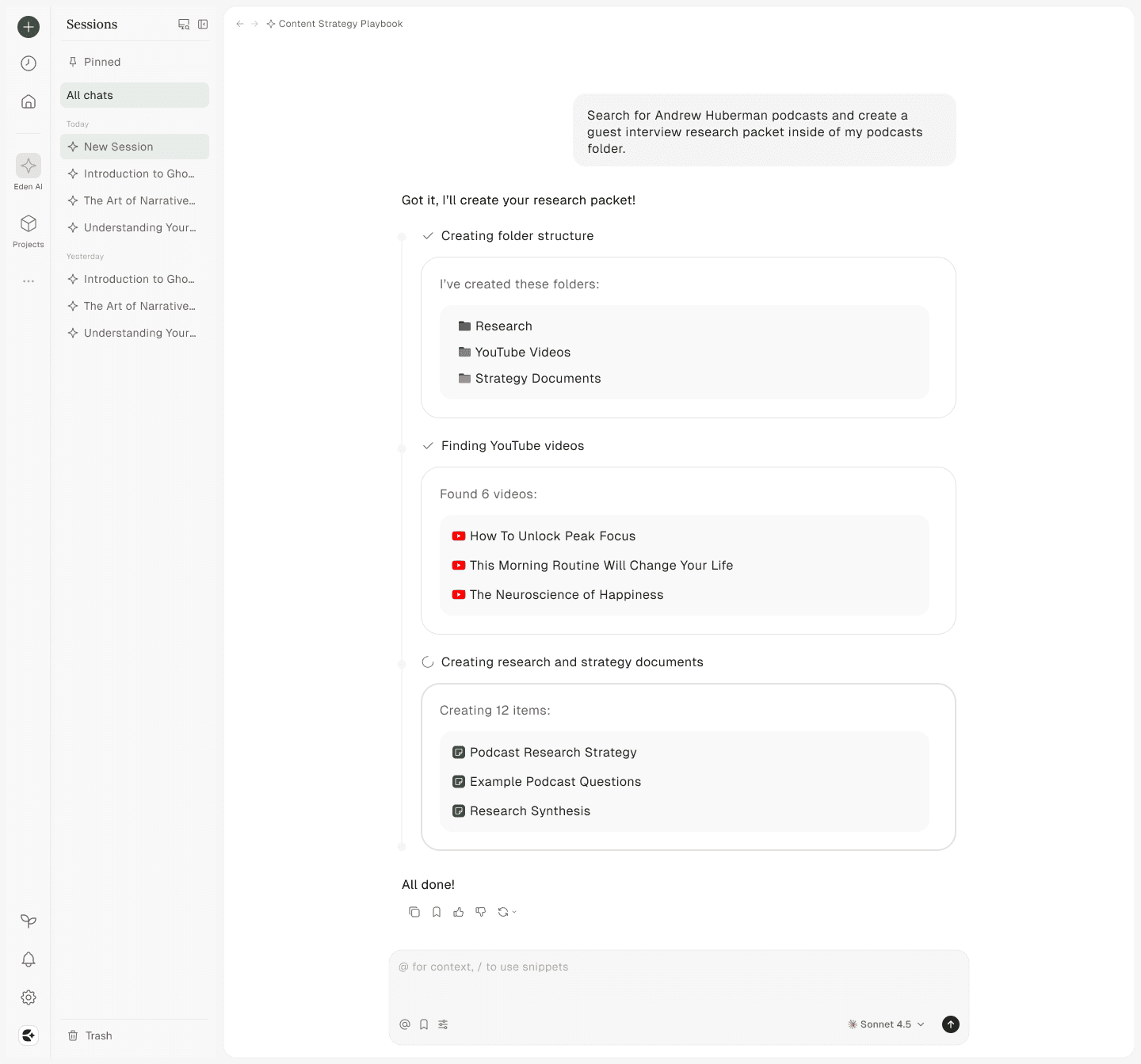
The "Chat" feature of Eden is now called "Eden AI" where the chats have agentic functionality.
What does that mean? It means that it can do anything that you can do inside your workspace (it can also search the web). It can create files or documents, create or organize folders, search for information, or just move things around.
That may sound underwhelming at first, but your creativity determines how powerful it can be.
As an example, did you know that you can create video clips in Eden? And since you can save YouTube videos to your workspace, what if you asked the agent to "Find the most impactful parts of this video that are no longer than 45 seconds. Then, create clips out of the 3 best ones and add them to a 'Clips' folder." This one is complex, so you may run into bugs if you try it. Please let us know if you do run into bugs!
Another example, what if you wanted you wanted to organize your notes and files using the "PARA" system for digital organization? You could tell the agent about who you are and what you do, then ask it to create a PARA folder structure. When you create or upload new files, you can ask the agent to organize them accordingly.
As a big example, since the agent can search the internet (and since Eden allows you to save links), I could ask for 10 podcasts that a specific person appeared on, and ask it to save it to a folder. The videos will then download and transcribe like normal.
The thing about the agent feature is that prompting becomes more important. The more specific you are, the better it will be. If you are too vague, it may not lead to the best results.
Markdown Support & Editor
Adding agentic functionality made us realize the need for markdown files.
Because in the future, when you can mount Eden to your local file system and edit files straight on the cloud (without downloading them (yes this feature is built out but not released)), other agents and tools should be able to edit files inside of Eden.
So, right now, our agent will create markdown files when you ask it to write something.
This means we had to build a custom editor from scratch. It also means that Notes inside of Eden are a different file type for now. This will cause some temporary hiccups until we can safely change all Note files to markdown files.
Please keep this in mind over the next week or so. We will be rolling out improvements daily to the markdown editor so that it becomes even better than the note editor we already had.
AI Usage & Credits
There have been a few questions and concerns around the new credit system.
Before we address them, a handful of people experienced a bug that drained their credits faster. This has been fixed and credit usage is accurate.
For that reason, in case others also experienced that bug, we reset everyones credits earlier today to the full amount you get each month. So, you get a few extra credits on us this month.
Onto the details:
Since we've moved to the new credit system, we now bill more accurately to how much you use. Previously, and admittedly, you were a bit spoiled. One request equaled one AI message no matter the model or amount of context.
There are users who will send 20-30 messages with Claude Opus 4.5, maxing out context limits with long videos and PDFs, which would cost anywhere between $50 and $100 for those messages. On a $17/month Starter tier, that doesn't make much sense. If Eden is to continue forward in any meaningful way, this is not a good long term strategy.
With a credit based system, power users can run through credits extremely fast. This isn't unique to Eden. Reddit is full of user complaints about burning through their usage in a day. It happens to Manus, Cursor, Claude, ChatGPT and more. Many people think they are casual users when they are genuine power users. In Eden, however, it is very easy to increase context since you can easily @ mention huge files. We do have guidelines to prevent context bloat in place for the Projects feature and workspace search. It searches for the right files to pull into context rather than pulling everything in.
Note: We had a question about why sending one simple message cost a lot of credits. If you send a message in a chat with 150K tokens worth of context in it already, that message will use 150K tokens worth of credits. This is how every AI tool works. How many credits that is depends on the model you use, because their prices differ.
Now, AI usage reflects what you pay for in terms of token usage and model cost. "Credits" are a way of charging for tokens while considering the cost of different models under one standardized concept. File/video processing and storage are also baked into the cost of each tier. Of course, and as mentioned above, you can now add-on credits to any tier if you don't need the storage of the next tier.
In the context of agents, if you aren't careful, you can use up credits extremely fast. Especially if you use very expensive models like Claude Opus 4.5. If you do not care about the cost because AI can act as a team of employees (employees would normally cost thousands per month, not a hundred or so using Eden), then continue chatting on! If you do not plan on upgrading to a tier or adding on credits, consider using a less expensive model. Play around with the models to see what results they get.
By default, you are set to what we believe is a high quality model for thinking and agentic work. If you want to use less credits, switch to a different model and test which one suits your needs.
Beyond that, here are a few tips to make the most of your usage:
Create new chats often – Long chats have more context.
Ask to summarize long chats – Save the summary of a chat to a document to reference in another chat to avoid stacking up context.
Use different models for different tasks – Switch to a less expensive model when asking simple questions.
Be specific with your prompts – Write detailed chat messages so the AI doesn't guess, requiring more back and forth.
By default, you are set to our "Best" model to ensure your chat experience is high quality out of the box. If you want to stretch your usage limits further, consider switching to a less expensive model.
If you'd like more tips, we wrote a help center article on it here.
That's it for now. We hope you enjoy the new features!
# 0006
A Quick Look Into The Future
Our pricing now reflects what it will be at launch (rather than the Black Friday pricing we had prior), and we've updated our AI usage model to reflect actual usage and context.
In this update, we want to give a quick look at what's coming next.
Please note: The timelines we give may change. Things may be ready sooner or later, so treat the timelines as a soft estimate.
1) Projects & Agent
At the end of this month (yes, in a week or so) we plan to roll out the projects and agent feature.
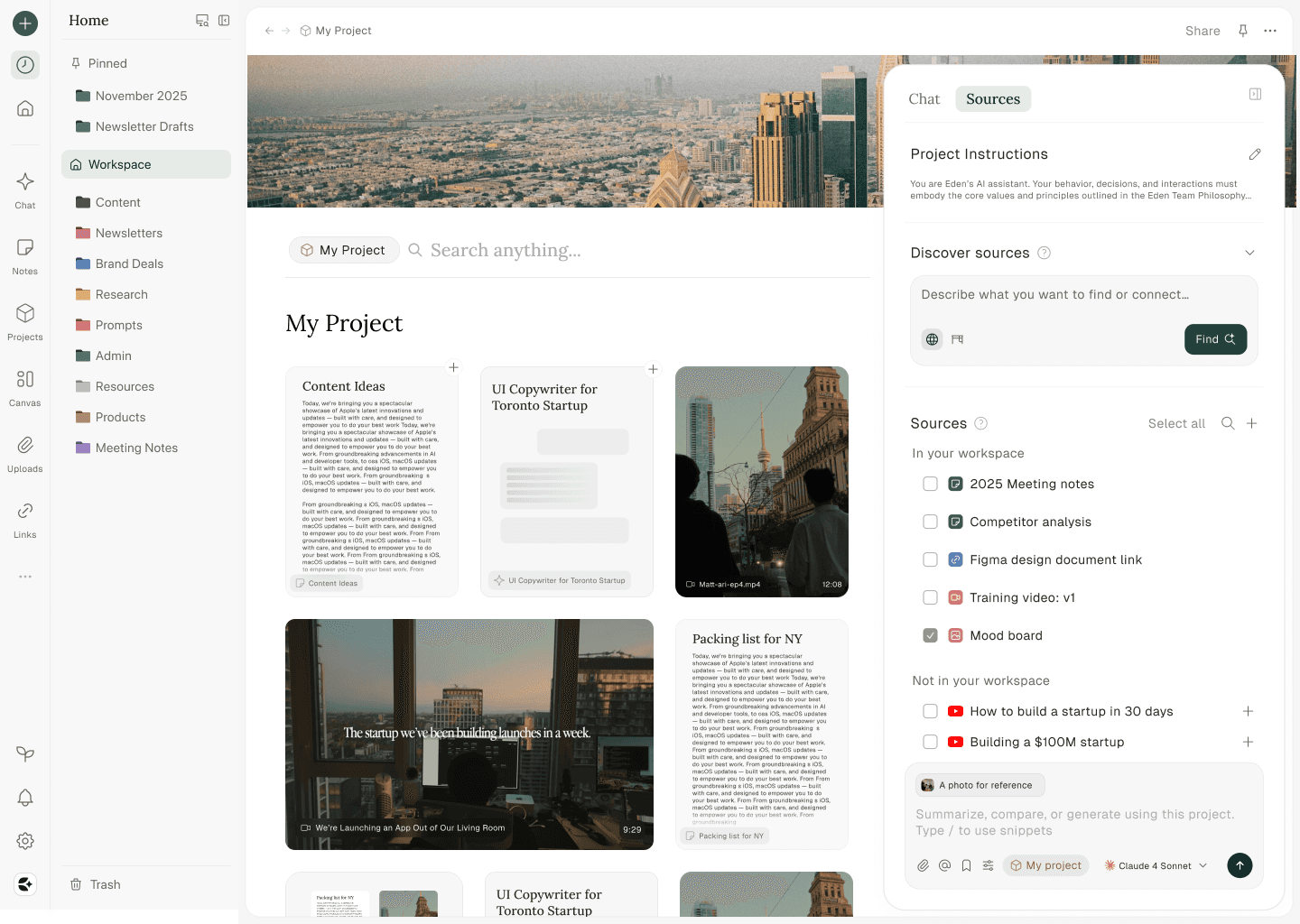
If you've used Claude Projects or NotebookLM, you get the gist of what this is. The difference with Eden is that all of your files, links, and notes are in your drive.
When you start a project, you can add files, folders, links, and more to the project itself. Originally, we wondered if we could just have folders be projects, but when you're working on a project, you're often pulling in research here, a video there, and a few notes from somewhere else.
As an example, say you want to create a YouTube video script.
In a project, you could add links to Youtube videos as research, past scripts you've written, a brain dump of your ideas, and a few notes with frameworks and context that the AI can reference. Then, you can open your script, have your list of AI chats on the side, and start working. This will be a huge win for creative work.
In terms of Eden Agent, think of it like Claude Cowork or Claude Code, but in your workspace. Now, ours won't be as robust from the start, but it will be quite magical.
Since Eden is for creatives, we believe that most of your creative work should have you in the loop. You should be able to do it manually with AI by your side.
But in the business of creativity, there is a lot of mundane busywork that you still have to do. This is where Agent comes into play.
A few examples of what you could do:
"Pull all YouTube videos from my workspace that talk about content creation, draft a research document with all core insights, and prepare a folder for my newsletter this week using my outline template."
"Using my copywriting knowledge base, draft a 14 day email sequence for the launch of my new product."
"Using everything you know about my company, build out a help center that teaches about each feature and how to use the product."
These are a few examples out of countless, but Eden Agent will be able to find, draft, and organize things within your drive.
Once these are released, we will be sending writeups and posting tutorials on how to make the most of them.
2) Mobile and Desktop
We plan to roll out the first iteration of the mobile app starting with a small group of VIP users around the same time as what we mentioned above. Once we iron out the kinks, we will continue rolling it out based on what plan you are on.
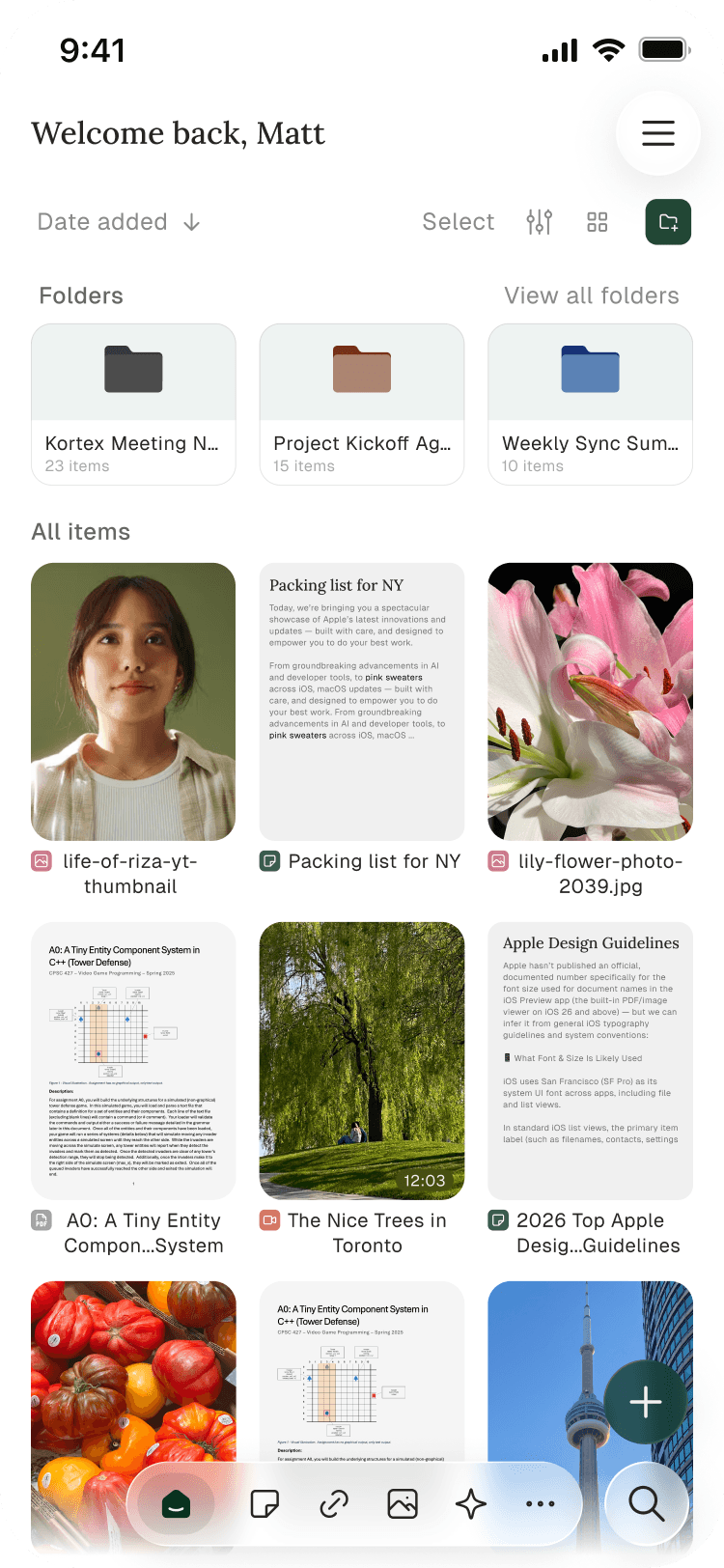
The core mobile feature we are excited for will be the ability to "share to Eden."
Meaning, if you are watching a YouTube video, you can hit "Share" and save it directly to the folder you want, or you can start chatting with it immediately. Or you can tell Eden Agent to do something with it.
Now, in relation to the desktop app, this is where things really get exciting.
We do not plan to release this until closer to our full public launch.
With the desktop app, you will be able to mount your drive to your computer's file system, similar to Dropbox. So, you can keep files online or offline. You will also see an "Eden" folder in your file system that you can drag files to so you can access whatever you need.
Of course, floating chats, items, and a spotlight search are also on the menu, but those will come as they come.
We have a lot more tentative items on our mental roadmap, but we will save sharing those for another date, because this is all an iterative process. We believe we are aimed in the right direction, but we are willing to discover new paths as we go.
We will leave it at that.
We hope you're as excited as we are!
Oh, last thing for those who care. We are working on a revamp of Notes and other file types in Eden. Notes will become markdown native, making them interoperable between other apps (and so you can easily use mardown files from outside of Eden inside of it). Other files, like CSVs and HTML embeds for data visualizations or landing page mockups, will also be supported. That way, Eden Agent can do that much more.
# 0005
New: Snippets Are Here
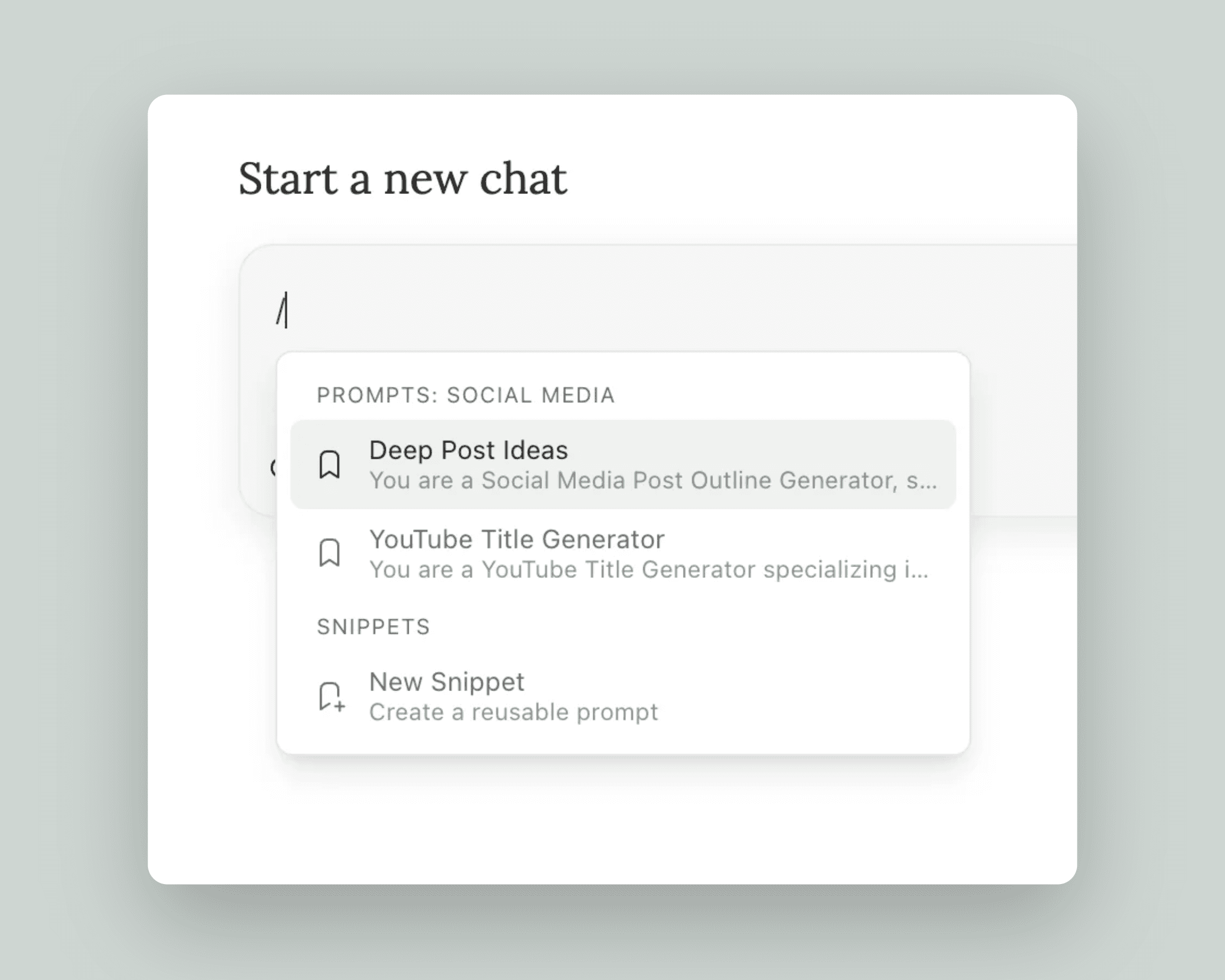
Meet Snippets, your new shortcut to faster workflows. Save any text, prompt, or reusable content as a snippet, then insert it anywhere with a quick / command.
Use them everywhere — Access snippets from the slash menu in notes, or use them directly in chats to quickly reference your go-to prompts and templates. (At the moment, only snippets saved as prompts will show in the AI chat input).
Save from anywhere — Turn any message, AI response, or text selection into a snippet with one click. We've added a ribbon icon to chat messages so you can save great responses instantly.
Keep it personal or share — Set snippets as private or share them with your whole workspace. Perfect for teams who want consistent prompts and templates.
To create or access Snippets:
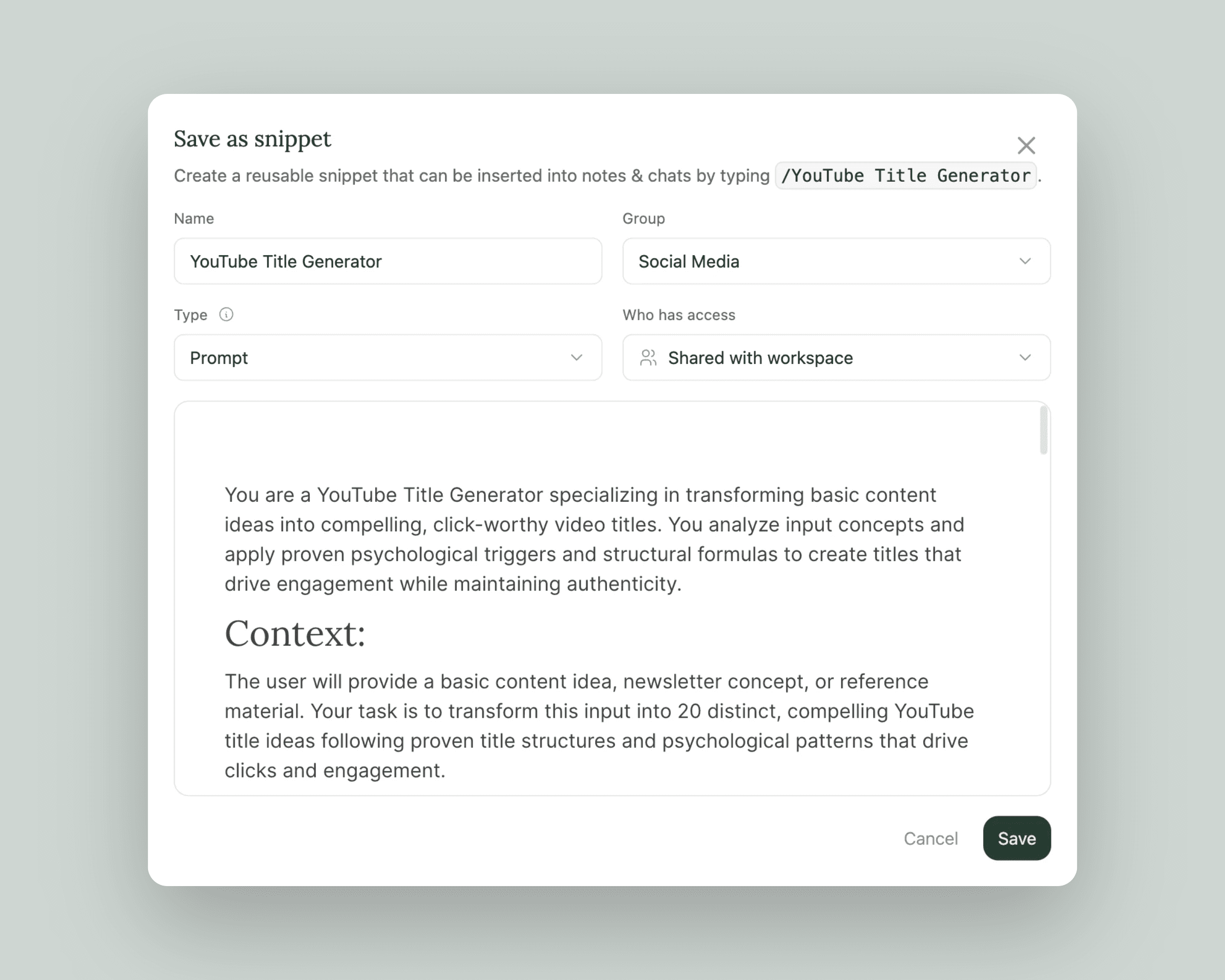
Highlight text inside a Note and click the ribbon icon in the bubble menu.
Type
/in a note and type "New Snippet," or search for Snippets you've already created.Navigate to an AI chat and click the ribbon icon at the bottom of the text input.
Navigate to Settings > Snippets to create, edit, or delete Snippets.
In future updates, we will further integrate Snippets into the entire workspace, and the Snippets you save as prompts will show up in the New Chat page so you can quickly pick from them.
For more on Snippets:
Improvements
@ Mentions: Completely redesigned with fuzzy search (typo-friendly!), folder paths for easier identification, and your recent items shown at the top.
Keyboard Navigation: Grid and list views are now fully keyboard navigable. Use arrow keys to move around and Shift+click for multi-select.
Editor Formatting: Multi-line messages now display with proper formatting preserved.
Slash Menu: Cleaner, more refined interface.
Settings Dialog: Smoother open/close animation.
Empty Folders: Now default to grid view for a cleaner look.
Under the Hood
(Coming Soon) Multi-Region Infrastructure: You will soon be able to migrate your files to a region closer to you and sync across multiple availability zones, meaning better reliability and faster access no matter where you are.
Chat Response Speed: Fixed slow character-by-character responses — AI replies now stream smoothly again.
Fixes
@ Menu: Fixed scrolling and selection — clicking items after scrolling now works correctly.
Command Menu: Long text no longer gets cut off at the edges.
Chat Processing: Resolved an issue where chats would get stuck on "processing" for large PDFs.
Waitlist: Fixed a signup error that was preventing some users from joining.
Questions or feedback? Reach out at support@eden.so
# 0004
New: Help Center
We launched our new Help Center at eden.so/help so you can learn or get support. This will be updated as we receive questions and release new features.
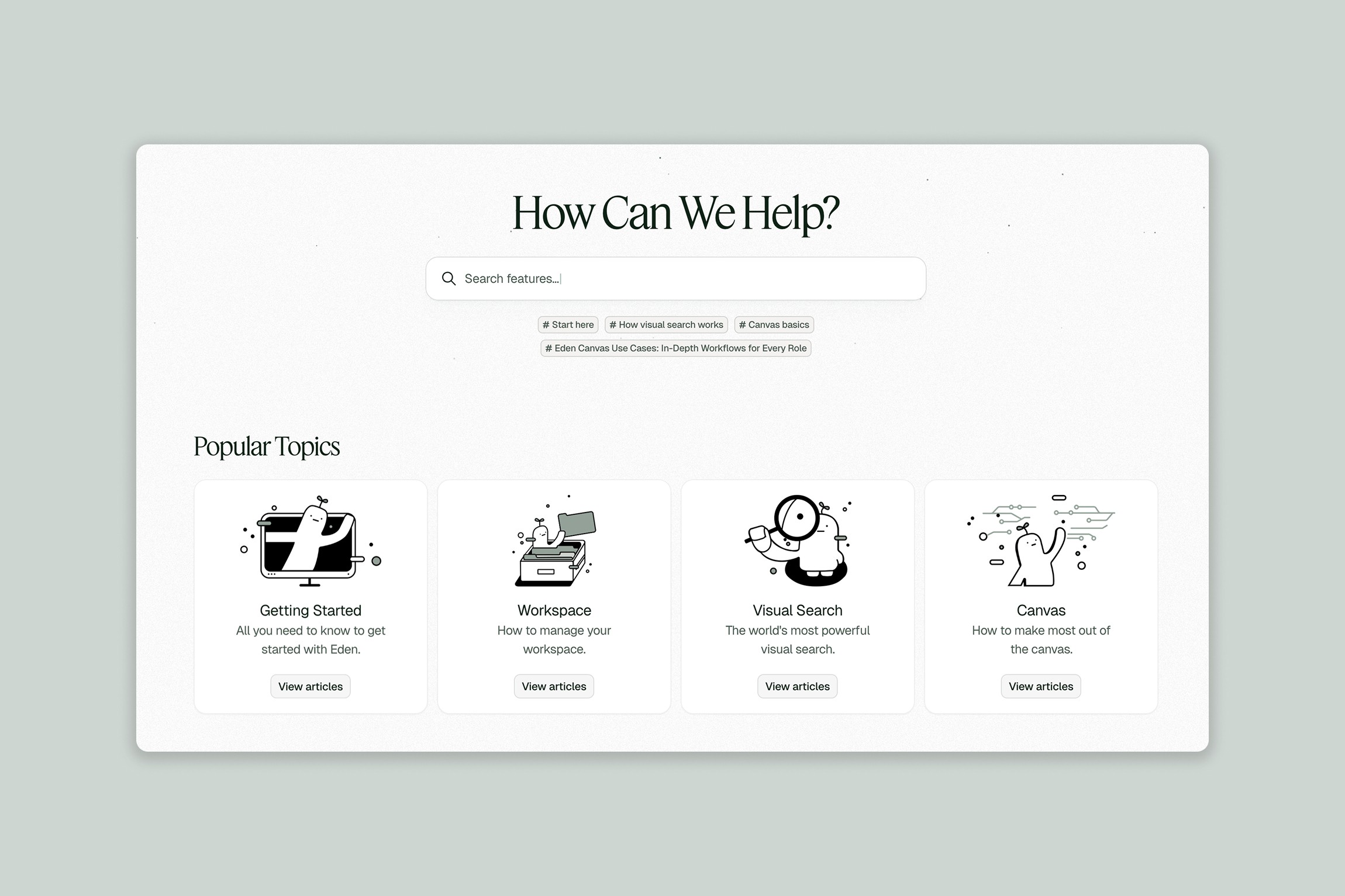
You can chat with our AI agent, Ed, in the bottom right corner, get answers about Eden features, or submit bugs directly. There are 30+ articles on how to get started, how to use each feature, and tips to get the most out of Eden.
One of our favorites is the Canvas uses cases article, for those who need some inspiration for what to use the canvas feature for. You can read that here.
Additions
Save AI Chats as Notes — Never lose a great conversation again. Hit the new "Create Note" icon in any chat to save it directly to your workspace as a permanent note.
Audio File UI & Transcripts — Upload audio files to your workspace, play through them, and read the transcript.
Fuzzy Search — Find what you're looking for even with typos. Search "episode 10" to find "ep 10", see highlighted matches, and folder results now show their parent folder. Works in Save To and Move To menus too.
Drag and Drop — Now working in list view and with multi-select. Move items into folders from any view, drag between panes and the sidebar, with custom previews and stacking undo toasts for bulk moves.
Gemini 3 Flash & GPT-5.2 — Two powerful new AI models available in the model selector.
Support In Settings — New section in Settings under "Account" with a direct link to the help center.
Improvements
Search: Improved relevance sorting prioritizes title matches, exact words, and visual matches
Command Menu: Recents section now actually updates, search works reliably, and you can press Tab to navigate directly into folders
List Views: Smooth scrolling with optimized virtualization — no more lag
Canvas: Significant performance improvements when working with many elements
Video Player: Videos now play reliably — no more freezing or infinite spinners
Video Thumbnails: High-res images now load faster with optimized lower-resolution thumbnails
Chat Streaming: Replaced markdown renderer for smoother AI responses
PDFs: Lightweight text extraction for unprocessed PDFs to access content sooner in an AI chat
Canvas Notes: Creating a new note now auto-focuses the cursor so you can start typing immediately
Duplicate Folders: You can now duplicate entire folders — great for templates and recurring projects
Processing Modal: Click any item in the processing modal to navigate directly to it
Multi-select: Selecting items in the sidebar no longer navigates away from your current view
Fixes
AI Chat: Responses no longer pause when you switch to another screen
Note Contents: Fixed an issue where opening certain notes would wipe their contents
Tags: Tags now appear in search immediately after creation, inline tags link properly, and deleted tags no longer appear in dropdowns
Canvas Chats: Chats connected to notes in canvas can now read and reference those notes correctly
Video Playback: Fixed videos that were stuck on infinite loading spinners
Video Keyframes: Keyframe thumbnails now match the actual video frame at each timestamp
Copy/Paste: Copying text from chat no longer pastes as code
Text Selection: You can now select specific lines in chat without auto-selecting everything above
Upload Processing: Fixed "ghost" items getting stuck in the processing queue
Drag Animation: Fixed flyback animation glitches when multi-selecting items
App Crashes: Fixed a crash that occurred when drag-and-dropping nested folders onto themselves
Task Modal: The processing modal no longer pops up randomly
Copy/Paste Tags: You can now copy and paste tags and connections properly
Profile Picture: Your avatar now displays correctly in Settings
Downloads: Fixed download errors that were preventing note exports
Landing Page: Fixed the typing animation causing page jumps on mobile Safari
# 0003
Fixes & Improvements
We've added more regions to our servers, specifically in Europe and Southeast Asia. We had some users experiencing slowness and difficulty uploading. This should be much better now and will only continue to get better.
We've drafted around 30 general tutorials and articles that will be up on our website soon (many have been asking for this).
Many were experiencing issues referencing PDFs in chats. At first, we thought it was a context issue, so we improved that. When it kept happening, we realized that people were using the "Best" model which would route to Claude 4.5 Haiku in some cases. This model has a limit of 100 pages for a PDF. This should be fixed.
As a side note, when referencing large files like PDFs or YouTube videos, consider using a model like Gemini. It's context limits are much higher than most Claude or GPT models.
We are also working on chat summarization and smarter context handling. That way if you reference large files, you can continue chatting beyond normal model context limits.
Videos were uploading but the transcript wasn't displaying when you go into the video. This is now fixed.
Video playback and loading issues have been fixed. When some would upload a video, it would show an infinite loading screen. If you were experiencing this issue, please delete the affected video and reupload it.
We implimented a "level of detail" system in the canvas that renders a less detailed version the further you zoom out, and a more detailed version the more you zoom in. This helps with canvas lag a lot. However, canvases with many long chats are still lagging. We will continue to implement improvements for this.
The command menu (CMD+K) experience should be a lot better. Various actions wouldn't work and occasionally returned irrelevant results. This applies to the canvas "Add From Workspace" button.
General fixes around uploads, transcript reliability, and more have gone in.
General fixes with YouTube videos not being read by a chat have gone in.
Numerous fixes for individuals in support. Internally we've implemented a more efficient bug tracking and project management system to improve communications from users to our support team to our dev team.
Lastly, as requested, you are now able to drag and drop files and folders in your workspace. With this, we wanted to get this in quick. We are still working on being able to drag items from your sidebar into a canvas, and being able to multi-select and drag into a folder.