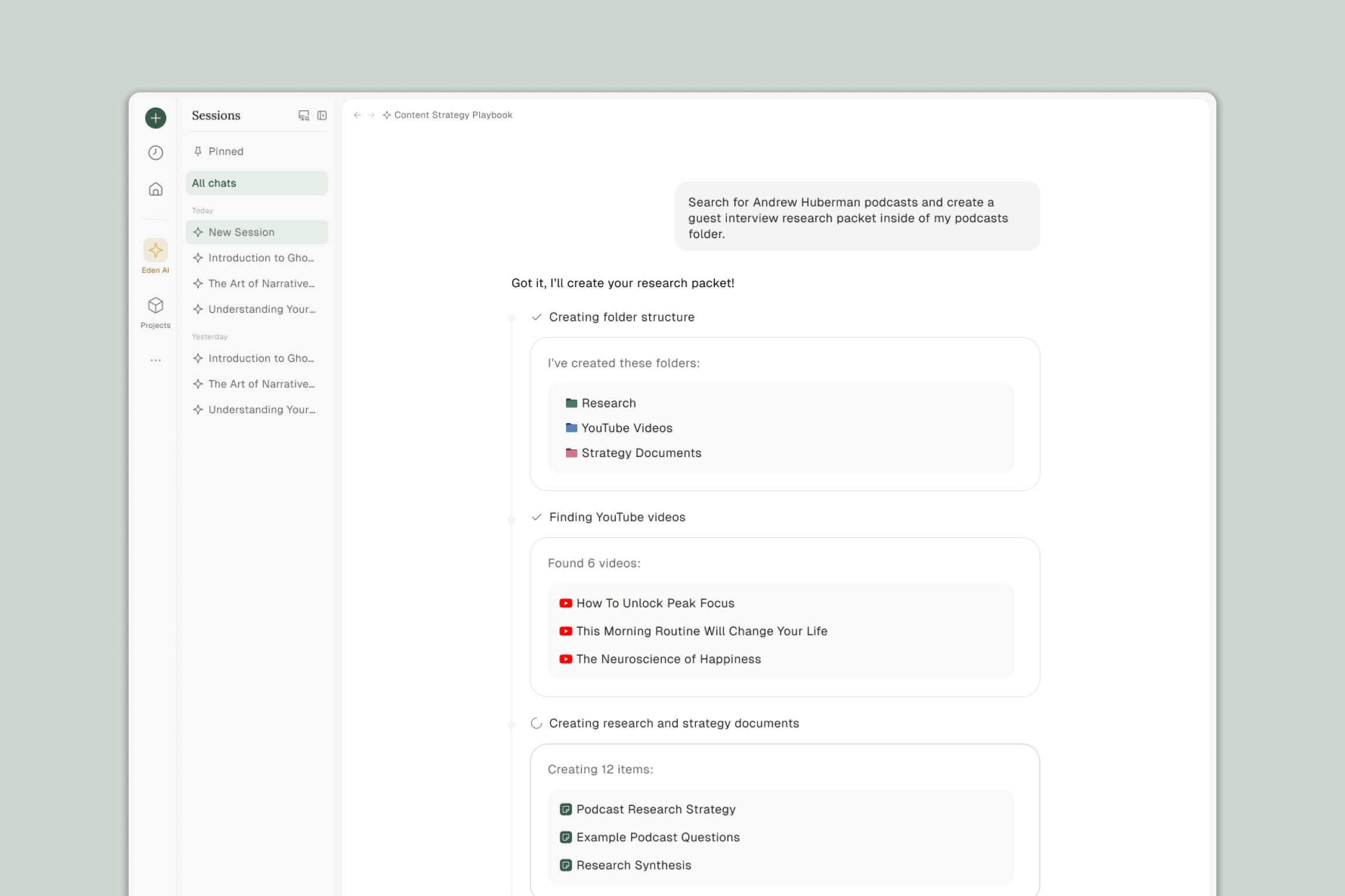
Eden Agent is AI that handles your busywork. While most AI tools help you find information and answer questions, Agent actually takes action — creating files, editing documents, organizing your workspace, and drafting content from your research.
Agent is built into Eden's chat. You can ask questions, get answers, and request actions all in the same conversation. When you need something done, just describe what you want and Agent builds it.
What Makes Eden Agent Different
Most AI assistants live outside your files. You copy content in, get a response, then copy it back out. Eden Agent works inside your workspace, where your files, links, and documents already live.
This means:
No connecting external tools. Your entire drive is already accessible.
No copy-pasting between apps. Agent edits and creates directly in your workspace.
No losing context. Agent can reference anything you've uploaded, linked, or written.
What Agent Can Do
Create Files
Agent can create new files directly in your workspace:
Markdown documents for notes, outlines, and drafts
CSV files for data and tables
HTML files for embeds and data visualizations
When you ask Agent to create something, the file appears in your workspace ready to use.
Edit Documents
Point Agent at any document and tell it what to change. Agent can:
Rewrite sections based on your instructions
Restructure content organization
Add new sections or information
Improve clarity and fix issues
Update documents with information from other sources
You don't need to copy text into a chat window. Agent edits the actual file.
Organize Your Workspace
Agent can handle the tedious organizational work:
Create new folders
Move items between folders
Rename files and folders
Build folder structures based on your needs
Tell Agent how you want things organized and it handles the rest.
Draft From Your Research
Agent can pull from everything in your workspace — files, links, notes, transcripts — and create first drafts. Instead of staring at a blank page, you get something to react to and refine.
Research the Web
Agent can search the web, find relevant content, and add links to your workspace. Ask it to find YouTube videos on a topic, research competitors, or gather sources for a project. Found content gets transcribed and analyzed automatically, just like anything else in Eden.
How Agent Works
Agent is built into Eden's chat, which lives in your sidebar. You interact with Agent through natural conversation:
You describe what you need. Use plain language. "Create a folder structure for my client projects" or "Draft an outline based on the research in this folder."
Agent takes action. It creates files, edits documents, organizes folders, or drafts content based on your request.
You see the results. New files appear in your workspace. The chat describes what Agent did so you can review and make changes.
Agent understands the difference between questions and actions. Ask "What's in this document?" and you get an answer. Ask "Summarize this document into a new note" and Agent creates the file.
What Agent Can Access
Agent can access anything in your workspace:
Uploaded files (videos, PDFs, images, audio)
Links you've added (YouTube, articles, social posts)
Notes and documents you've created
Transcripts and analyzed content
Your folder structure
This means Agent can reference your actual research when drafting, pull from multiple sources when creating documents, and understand your existing organization when making changes.
Plans and Usage
Agent is available on all Eden plans. It uses the same credits as AI chat — there's no separate limit or additional cost for Agent actions.
Frequently Asked Questions
Is Agent a separate feature from chat?
No. Agent is built into Eden's chat. You can ask questions, get answers, and request actions all in the same conversation. Chat understands when you want information versus when you want something done.
Can Agent delete my files?
Agent can move, rename, and organize files, but permanent deletion requires you to take that action yourself.
Does Agent remember previous conversations?
Agent has access to your workspace and can reference anything you've added. Conversation context works the same as regular chat.
What if Agent does something I didn't want?
You can ask Agent to make changes or undo its work. You can also manually move, rename, or delete anything Agent created.
Can Agent work with any file type?
Agent works with most common file types. Some specialized formats (like epub) have limited support. If you're working with an unusual file type and run into issues, contact support@eden.so.
Thank you.

