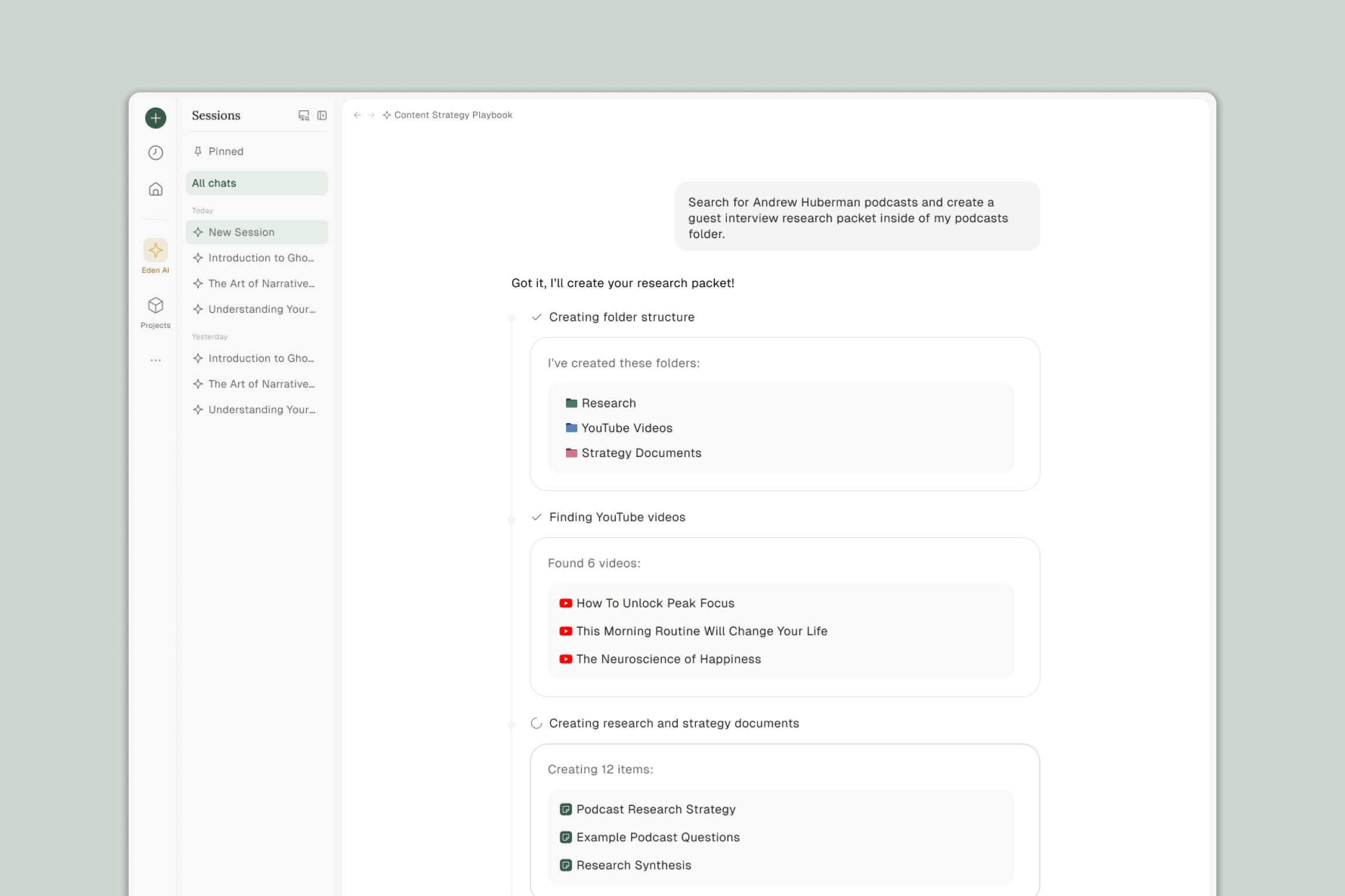
See how YouTubers, podcasters, and creators use Eden Agent to shortcut the tedious parts of content production — from research to publishing.
Every creator knows the feeling: you have the idea, you've done the research, but there's still hours of work between you and a finished piece. Organizing footage. Pulling quotes. Repurposing for other platforms. Writing show notes. The creative part is fun. The rest is a grind.
Eden Agent handles the grind. These workflows show what's possible when AI can actually take action inside your workspace — not just answer questions, but build things you can use.
Table of Contents
Complex Workflows
Script to B-Roll to Editor-Ready Folder
Competitor Teardown to Content Calendar
Podcast Episode to Full Content Suite
Course Planning from Raw Ideas
Client Feedback to Completed Revisions
Guest Research Packet
Video Performance Analysis to Iteration Playbook
Sponsorship Management System
Steal Like an Artist Breakdown
Quick Tasks
. Swipe File Curation
Interview Question Generation
Video to Blog Repurposing
Quote and Clip Extraction
Research to Outline
Complex Workflows
These workflows chain multiple Agent actions together. You start with raw material and end with a system, a deliverable, or something you can hand off to your team.
1. Script to B-Roll to Editor-Ready Folder
You have a script or outline for a talking-head video or essay. Now you need visuals. Instead of describing "get some b-roll here" and leaving your editor to figure it out, Agent turns your script into specific, searchable footage — and gathers it for you.
What Agent does:
Reads your script and identifies moments that need visual support
Suggests specific b-roll concepts (e.g., "World of Warcraft gameplay to represent 'leveling up'" or "time-lapse of city traffic for 'life moving fast'")
Maps each concept to searchable YouTube titles or stock footage descriptions
Finds relevant YouTube videos and adds them to a new folder
Creates a document matching timestamps in your script to the footage
Sample prompt:
I've attached my video script. Go through it and identify every moment that would benefit from b-roll or visual cutaways.
For each moment:
Suggest a specific visual concept that represents the idea (be creative — metaphors and unexpected visuals are great)
Turn that concept into a searchable YouTube or stock footage query
Find 2-3 YouTube videos that match and add them to a new folder called "B-Roll for [Video Title]"
Then create a document that maps each script section to its b-roll options with timestamps.
You end up with: A folder your editor can drag into their project, plus a reference document. No more vague "add something here" notes.
2. Competitor Teardown to Content Calendar
You know you should study what's working in your niche. But "watch competitor videos and take notes" always falls to the bottom of the list. Agent does the analysis and turns it into action.
What Agent does:
Analyzes competitor channels: topics, formats, what gets views, posting patterns
Identifies content gaps — angles they're missing or underserving
Creates a content calendar with video ideas that fill those gaps
Includes suggested titles, hooks, and why each idea could work
Sample prompt:
I'm adding 5 YouTube channels in my niche to this folder. Analyze them and tell me:
What topics do they all cover?
What formats perform best (tutorials, essays, vlogs, etc.)?
What's missing — topics or angles none of them address well?
Then create a 30-day content calendar for my channel that fills those gaps. For each video idea, include a working title, a hook, and a one-sentence rationale for why it could work.
You end up with: A strategic content plan built on actual research, not guessing.
3. Podcast Episode to Full Content Suite
One recording shouldn't be one piece of content. But repurposing takes time — reformatting, rewriting, adapting for each platform. Agent turns a single episode into a week's worth of content.
What Agent does:
Generates show notes with chapters and timestamps
Writes a blog post (restructured, not just the transcript)
Creates Twitter/X posts with the episode's best takes
Writes a LinkedIn article with a professional angle
Drafts a newsletter intro that teases the episode
Organizes everything into a folder
Sample prompt:
I've uploaded my latest podcast episode. Create a full content suite from it:
Show notes with timestamps and chapter markers
A blog post that restructures the conversation into a readable article (not just a transcript dump)
5 Twitter/X posts — pull the spiciest takes, make them standalone
A LinkedIn article that takes a more professional angle on the topic
A newsletter intro (2-3 paragraphs) that teases the episode and makes people want to listen
Put everything in a new folder called "[Episode Title] - Content Suite"
You end up with: One recording, five platforms covered, all in one folder.
4. Course Planning from Raw Ideas
You've talked about this topic for years — in videos, podcasts, tweets, conversations. You have the knowledge scattered everywhere. Agent finds the structure hiding in your existing content.
What Agent does:
Analyzes your existing content on the topic
Identifies core themes and logical progression
Creates a course outline with modules and lessons
Drafts lesson documents with talking points pulled from your existing material
Flags gaps where you'll need to create something new
Builds a folder structure matching the course
Sample prompt:
I want to create a course on [topic]. I'm adding everything I've already made on this subject — videos, podcast clips, notes, tweets, whatever I can find.
Analyze all of it and:
Identify the core themes and how they build on each other
Create a course outline with modules and lessons in a logical learning order
For each lesson, create a document with talking points and quotes pulled from my existing content
Create a "Gaps" document listing topics I'll need to record from scratch
Set up a folder structure that matches the course modules
The goal: I want to see what I already have before I start creating anything new.
You end up with: Course scaffolding built from your existing IP, with clear next steps.
5. Client Feedback to Completed Revisions
Client feedback arrives in emails, Loom videos, marked-up documents, Slack messages. Consolidating it takes almost as long as doing the revisions. Agent does both.
What Agent does:
Pulls feedback from multiple sources into a single checklist
Prioritizes by importance or urgency
Makes the revisions to your draft documents
Creates a summary of changes you can send back to the client
Sample prompt:
I've added all the feedback from my client — there are emails, a Loom transcript, and some comments in a doc.
Consolidate all feedback into a single revision checklist, organized by priority
Go through my draft [document name] and make the changes
Create a "Changes Made" summary document I can send to the client — keep it professional and brief
Flag anything you're unsure about so I can handle it manually.
You end up with: Revisions done, plus a client-ready summary. No more chasing feedback across five apps.
6. Guest Research Packet
You have a guest coming on your podcast. You could spend an hour Googling, or Agent could build a complete research packet while you do something else.
What Agent does:
Researches the guest: YouTube appearances, podcasts, articles, social posts
Adds relevant links to a research folder
Creates a briefing document: bio, interesting takes, potential topics, suggested questions
Flags questions they've answered a hundred times (so you can skip them)
Sample prompt:
I'm interviewing [Guest Name] on my podcast. They're known for [brief context].
Research them and build me a guest packet:
Find their YouTube appearances, podcast interviews, articles, and notable tweets. Add the best ones to a folder called "[Guest Name] Research"
Create a briefing document with:
A short bio
Their most interesting or contrarian takes
Topics they seem passionate about
10 suggested questions, ranked by how original they are
Flag any questions they've clearly answered many times before — I want to go deeper, not repeat their talking points
You end up with: A full research packet before the interview. You'll ask better questions because you're not scrambling.
7. Video Performance Analysis to Iteration Playbook
Your analytics tell you what happened. But they don't tell you what to do next. Agent connects the data to your actual content and finds patterns you can act on.
What Agent does:
Analyzes your recent videos: transcripts, titles, hooks, structure
Correlates with performance data: what retained, what got clicks, where people dropped off
Creates a "What's Working" document with patterns
Creates a "What to Stop Doing" document
Generates new video concepts applying the winning patterns
Sample prompt:
I'm adding my last 10 video transcripts and a CSV of my YouTube analytics.
Analyze them together and tell me:
What patterns do you see in my best-performing videos? (Hooks, structure, topics, pacing)
What patterns show up in videos that underperformed?
Create three documents:
"What's Working" — patterns to double down on
"What to Stop Doing" — patterns to avoid
"Next 3 Videos" — concepts that apply the winning patterns, with suggested titles and hooks
You end up with: Data-driven iteration, not guessing. Your next videos are built on what actually works for your audience.
8. Sponsorship Management System
Sponsorships mean deliverables, deadlines, and details scattered across emails and contracts. Agent builds you an ops system so nothing falls through the cracks.
What Agent does:
Creates a sponsor tracker: deliverables, deadlines, payment status
Builds a folder for each sponsor with subfolders for assets, scripts, and deliverables
Creates template scripts for integrated and dedicated reads
Pulls talking points from sponsor briefs into per-sponsor documents
Sample prompt:
I'm adding emails and briefs from my current sponsors: [Sponsor 1], [Sponsor 2], [Sponsor 3].
Build me a sponsorship management system:
Create a master tracker document with: sponsor name, deliverables, deadlines, payment status, and notes
Create a folder for each sponsor with subfolders: Assets, Scripts, Deliverables
Create template scripts — one for integrated reads (60-90 sec mid-roll) and one for dedicated reads (full sponsor segment)
For each sponsor, create a "Talking Points" doc pulling the key messages from their brief
You end up with: A sponsorship ops system. No more digging through emails to find what you owe and when.
9. Steal Like an Artist Breakdown
You admire certain creators. You want to learn from them intentionally, not just vaguely imitate. Agent breaks down what makes them work and helps you apply it.
What Agent does:
Analyzes creators you admire: pacing, structure, hooks, editing patterns, transitions, CTAs
Creates a "Style Guide" synthesizing what you could adopt
Drafts an outline for your next video applying those patterns
Sample prompt:
I've added 5 videos from creators I admire to this folder. I want to learn from them intentionally.
Analyze each video and break down:
How do they open? What's the hook structure?
How do they handle pacing and transitions?
What's their editing style? (fast cuts, lingering shots, text on screen, etc.)
How do they structure their argument or narrative?
What's their CTA approach?
Then create:
A "Style Guide" document synthesizing patterns I could adopt in my own work
An outline for my next video on [topic] that applies these patterns — don't copy, translate
You end up with: Intentional style development from sources you chose, not generic YouTube advice.
Quick Tasks
Not every task needs a complex workflow. These are single-prompt actions that save time on things you do regularly.
10. Swipe File Curation
Building a swipe file is smart. Actually building it is tedious. Let Agent do the collecting.
Sample prompt:
Find 10-15 YouTube videos about [topic/niche]. Look for ones with strong hooks, high engagement, or interesting angles.
Add them to a folder called "Swipe File - [Topic]" and create a document listing each video with a one-line note on why it's worth studying.
You end up with: A curated swipe file, ready for inspiration when you need it.
11. Interview Question Generation
You know the guest, you know the topic. You just need questions that aren't boring.
Sample prompt:
I'm interviewing [Guest Name] about [topic]. Here's their background: [brief bio or link to their work].
Generate 15 interview questions:
Mix of tactical (how-to) and philosophical (big-picture)
Include 2-3 unexpected or contrarian angles
Avoid anything surface-level they've probably answered before
You end up with: A question list that makes for a better conversation.
12. Video to Blog Repurposing
Your video is done. Now you need a blog post — but not just a transcript dump.
Sample prompt:
I've attached my video transcript. Turn it into a blog post:
Restructure for reading (not watching)
Add subheadings to break up the sections
Cut filler and repetition
Keep my voice but make it scannable
Aim for [X] words.
You end up with: A blog post that stands on its own, not a lazy transcript.
13. Quote and Clip Extraction
You recorded an hour of content. Somewhere in there are 5-10 moments worth clipping. Finding them takes forever.
Sample prompt:
I've uploaded a video/podcast. Find the 5-10 most quotable or clippable moments:
Surprising insights
Strong opinions
Funny or memorable lines
Anything that would work as a standalone clip
For each, give me the timestamp and a brief description of why it's worth clipping.
You end up with: A shortlist of moments to clip, with timestamps. No more scrubbing through footage.
14. Research to Outline
You've gathered sources. Now you need to turn them into a video structure.
Sample prompt:
I've added my research to this folder — YouTube videos, articles, notes.
Create an outline for a video on [topic]:
Suggest a hook based on what's most interesting in the research
Structure the argument or narrative logically
Note which source supports each section
Flag any gaps where I might need more research
You end up with: A video outline built from your actual research, with sources mapped to each section.
What to Try First
Pick one workflow that matches something you're working on this week. Run it. See what Agent builds.
The fastest way to understand what's possible is to try it on a real project — not a test. You'll immediately see where Agent saves you time and where you want to adjust the prompts for your workflow.
If you're not sure where to start, try Research to Outline or Swipe File Curation. They're quick, concrete, and useful for almost any creator.
Thank you.