Everything worth keeping, in one place.
- Grid, freeform, or list, per board
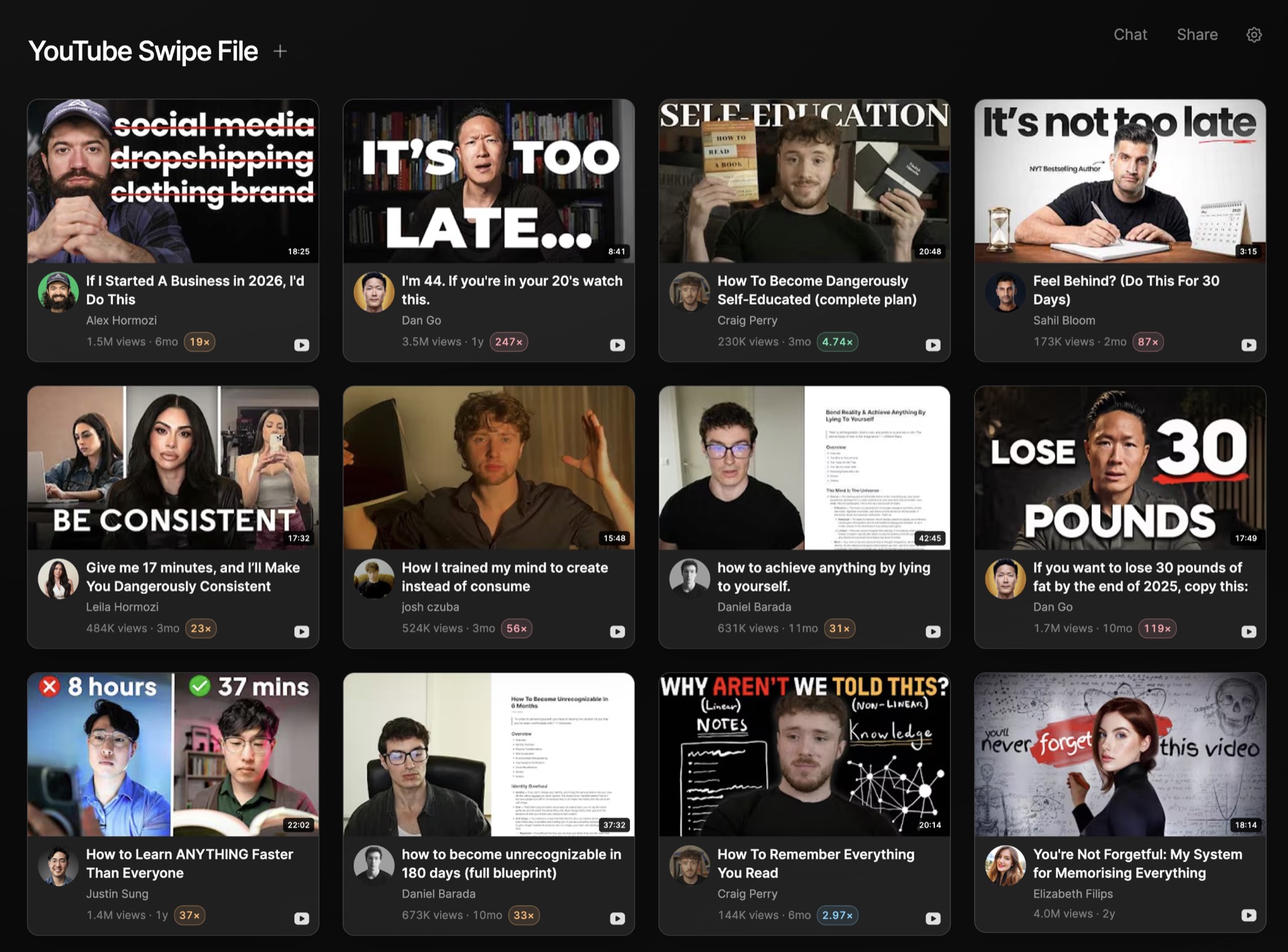
- Posts keep their creator and outlier multiple
- Sections to filter a long board
- Documents, cards, tables, chats beside it
- Chat with the whole board, or one item
- Share a link or invite by email
A wall of examples, not a blank page.
Posts keep their context. A saved post carries the creator, the platform, the numbers, and how far it beat that creator's typical post.
Sections for one slice at a time. Split a long board into chips like Hooks, Research, Drafts. All stays one click away.
Save from anywhere. Discover, a creator profile, a chat answer, a pasted link, or the Chrome extension while you browse.
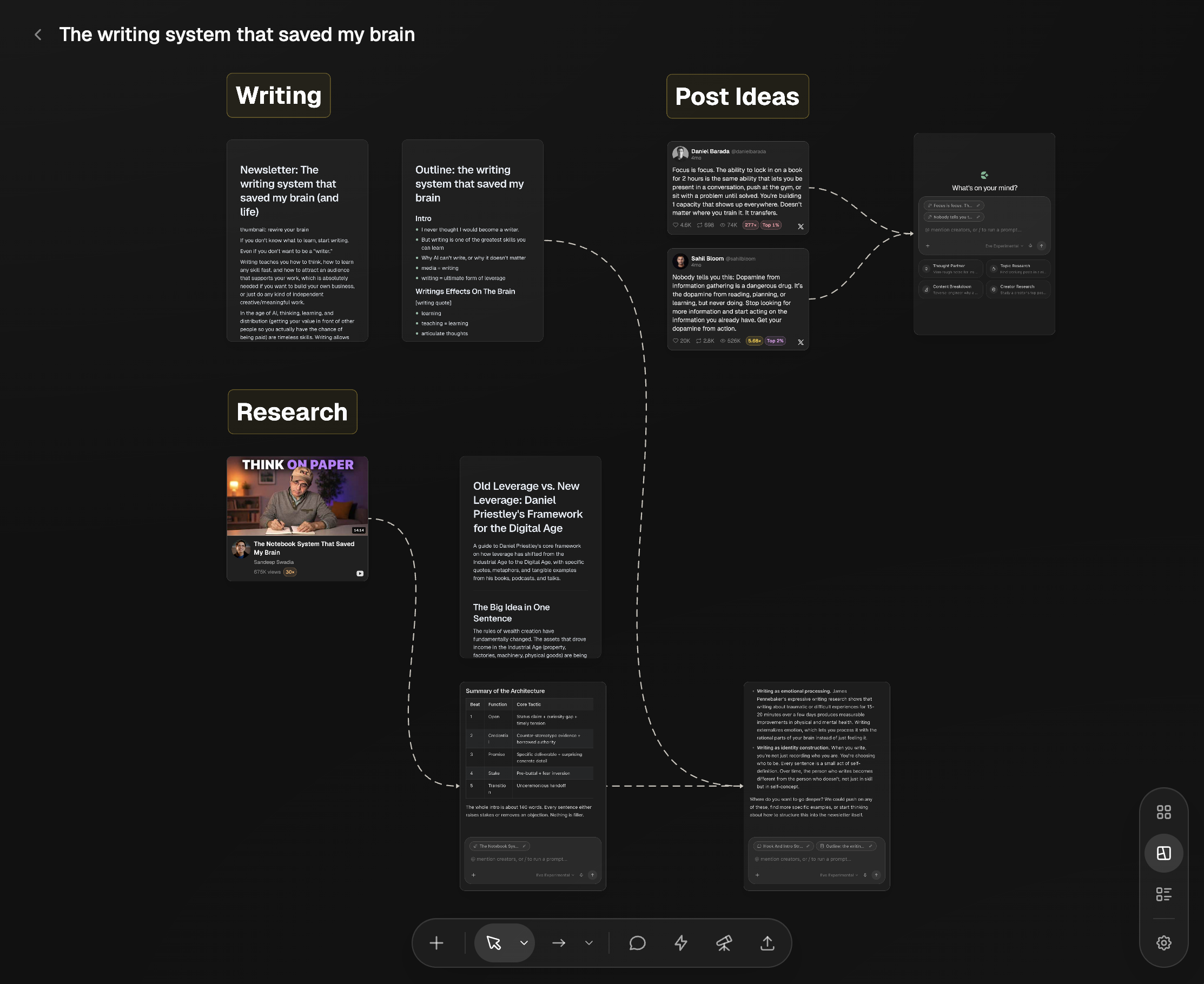
A thought partner that read everything you saved.
One click from the board. Chat pins the board into the conversation. Eden reads every item and knows which section each one is in.
Boost it. Break the board into post ideas, get variations, build a hook bank, or outline a long-form piece from the menu.
Grounded in your picks. Answers borrow from the posts you chose to study, and say which one, so the result sounds like your library.
Three layers, never a folder maze.
Pin what you open daily. Pinned boards stay at the top of the sidebar. Folders group the rest, one layer deep.
Add anything from the pill. Library items, links, documents, cards, tables, uploads, a new chat, a prompt, or a section, all from the + on the board.
Sort your way. Custom drag order by default, or by date created, last modified, name, or item type.

The parts people ask about before they start a board.
What can a board hold?
Saved posts from X, Threads, YouTube, TikTok, Instagram, LinkedIn, and Substack, plus links, images, PDFs and books, documents for long-form writing, cards for quick ideas, tables, prompts, and chats. Saved posts keep their creator, platform, and outlier multiple.
Is there a freeform canvas?
Yes. Every board can switch between Grid, Freeform, and List. Grid is best for saving inspiration, Freeform for creative projects, List for quick idea capture. The same items stay available in every view.
How do I organize a lot of boards?
Group related boards into a folder in the sidebar, and pin the two or three you open daily to the top. Inside a board, add sections like Ideas, Research, and Drafts and filter with the chip bar. Eden keeps it to three layers on purpose, so it never becomes a folder maze.
Can I chat with a board?
Yes. Click Chat on any board and Eden reads every item on it, including which section each one is in. Ask for title variations, a hook bank, an outline, or what the saved posts have in common. Mention a single item with @ to pull in just that one.
How do I save things to a board?
From Discover and creator profiles with the save button, by pasting any link straight onto the board, by dragging images or PDFs onto it, from the Chrome extension while you browse, or from a chat answer. Pasted links fetch their title and thumbnail on their own.
Can I share a board?
Yes. Share opens a link that anyone can view or comment on, or you can invite specific people by email with view or edit access. Anyone you share with can duplicate the board into their own account, which makes boards a natural shape for templates.
Can I write long-form on a board?
Yes. Create a document right on the board and write the piece beside the examples you saved. Documents have version history, footnotes, spelling and grammar checks, and comments.
Do boards work on the free plan?
Yes. The free plan is a boards-only home for swipe files and writing, with a cap on saved items. Paid plans add outlier research, scheduling, and the creator tools.

Give your ideas a place to live.
Start a board, save the work worth studying, and turn your own collection into your next post. Free to start.
Start a board