Reading the outlier multiplier
What the × number and the Top N% chip on a post mean, and how Eden works them out.
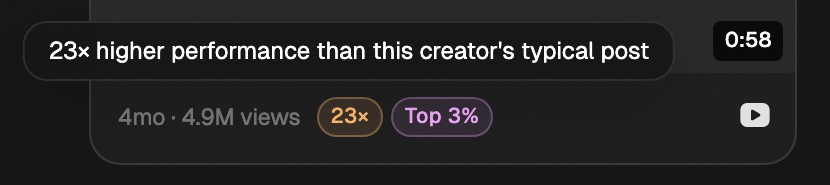
The multiplier compares a post to that creator's typical post. 8× means it got about 8 times their usual likes or views. Top 5% means it beat 95% of everything Eden has from that creator.
What each platform counts
| Platform | Measured on |
|---|---|
| X, Threads, LinkedIn, Substack | Likes |
| YouTube, TikTok | Views |
| Instagram Reels | Views |
| Instagram posts (carousels and photos) | Likes |
Reels and Instagram posts each get their own baseline, so one never skews the other.
How the multiplier is worked out
- 01
Take the creator's recent posts
The last 30 posts of the same kind, or every post from the past 7 days if that's more.
- 02
Find the median
The middle value of those posts. A median ignores one huge hit, so it shows what the creator usually gets.
- 03
Divide
Each post's likes or views, divided by that median, is its multiplier.
Two adjustments keep it fair:
- New posts. A post from this morning hasn't finished growing. Eden estimates where it will land so it doesn't look like a flop.
- Growing accounts. When Eden knows the follower count at the time of each post, it compares likes or views per follower. A creator who grew fast won't have every new post look like a hit.
Eden redoes the math each time it refreshes a creator's posts, so a number can change over time.
What "Top N%" means
- It ranks the post against every post of the same kind Eden has from that creator, not just recent ones.
- The chip only shows when a post is in the creator's top 10%.
- It needs at least 20 posts from that creator to work.
Why both: a creator who is always strong has a high median, so even their best post may only reach 3×. Top N% still catches it. Discover shows a post if it clears either bar.
Read the colors
| Color | Multiplier |
|---|---|
| Grey | Under 1× |
| Blue | 1× to 3× |
| Green | 3× to 5× |
| Amber | 5× to 10× |
| Orange | 10× to 50× |
| Red | 50× and up |
Under 10× shows two decimals, like 3.21×. From 10× up it rounds, like 27×. Hover the chip for a plain-English version.
What it doesn't tell you
- Whether the post is good. Some high scores are clickbait. Read it.
- Whether it will work in your niche or format.
Why a post has no multiplier
The platform hid the like or view count, or Eden doesn't have enough posts from that creator yet.
Get answers from the team and other creators.
Ask in the Eden help channel, see how others use the app, and come to the live workshops. Free with any Eden account.
Join the Eden CommunityEmail us. A real person reads every message.
Tell us what you tried and where you got stuck. We answer within one business day.
[email protected]