Find outlier YouTube videos
Filter Discover to YouTube, find videos that beat their channel's usual views, and save the best to a board.
In Discover, click the sliders icon in the search bar and turn on only YouTube. The feed now shows videos that got far more views than their channel usually gets.
Find outlier YouTube videos
- 01
Show only YouTube
Open the filters. Under Platforms, uncheck everything but YouTube.
Format → Videos hides Shorts. Min outlier score sets how big a breakout has to be. - 02
Pick your topic
Click a category chip above the feed. Or type a search (the $5 Discover plan, or Starter and up).
- 03
Raise the bar
Set Min outlier score to 10× or more to see only big breakouts. The default is 5×.
- 04
Save the best ones
Hover a video, click the + button, then Save post to board.
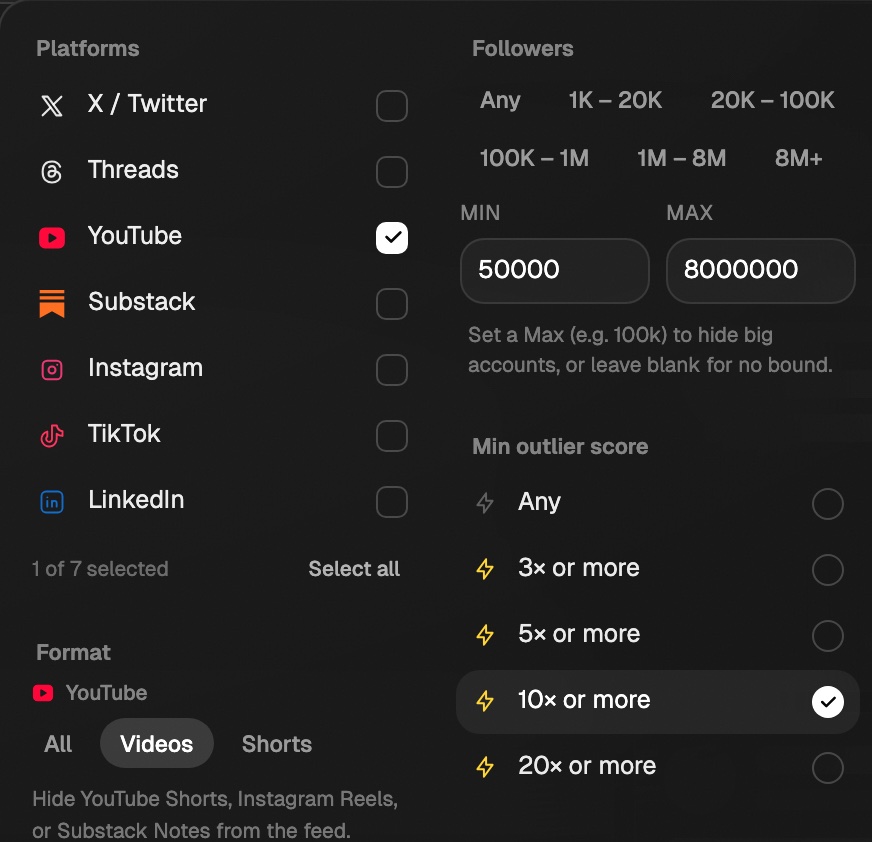
To skip Shorts, set Format to Videos. To see what works for channels your size, set Followers to your own range.
Study one channel
- Click the Creators tab and search a name, or paste a channel URL. Needs Starter or above.
- Or click the channel name on any video.
- Sort by Top outlier for their biggest breakouts.

What to look for
- Title. Save 20 outlier titles and read them as a list. The shapes repeat.
- Thumbnail. Look at them as a grid. Note faces, word count, and contrast.
- The first 30 seconds. How fast does it get to the point?
- Skip one-offs. Sponsored videos and breaking-news spikes rarely repeat.
YouTube at a glance
| Setting | For YouTube |
|---|---|
| Measured on | Views |
| Format chips | Videos (over about 3 minutes), Shorts |
| Profile sorts | Recent, Top liked, Top viewed, Top outlier |
Reading the outlier multiplier
What the × number and the Top N% chip on a post mean, and how Eden works them out.
Filter Discover
Narrow the Discover feed by topic, platform, creator size, outlier score, date, and more.
How creators use Eden boards as swipe files
Build a board of proven posts, keep it tight, and chat with it when you write.
Get answers from the team and other creators.
Ask in the Eden help channel, see how others use the app, and come to the live workshops. Free with any Eden account.
Join the Eden CommunityEmail us. A real person reads every message.
Tell us what you tried and where you got stuck. We answer within one business day.
[email protected]