Where your highlights live
Every highlight you make in Eden or import from Readwise, Kindle, and Snipd lives in your Library. Filter to see just highlights.
Your highlights live in the Library. Click Filter, then Type → Highlights to see only highlights. There is no separate Highlights pane anymore. Old links to it open the Library.
See all your highlights
- 01
Open the Library
Click Library in the sidebar.
- 02
Filter to highlights
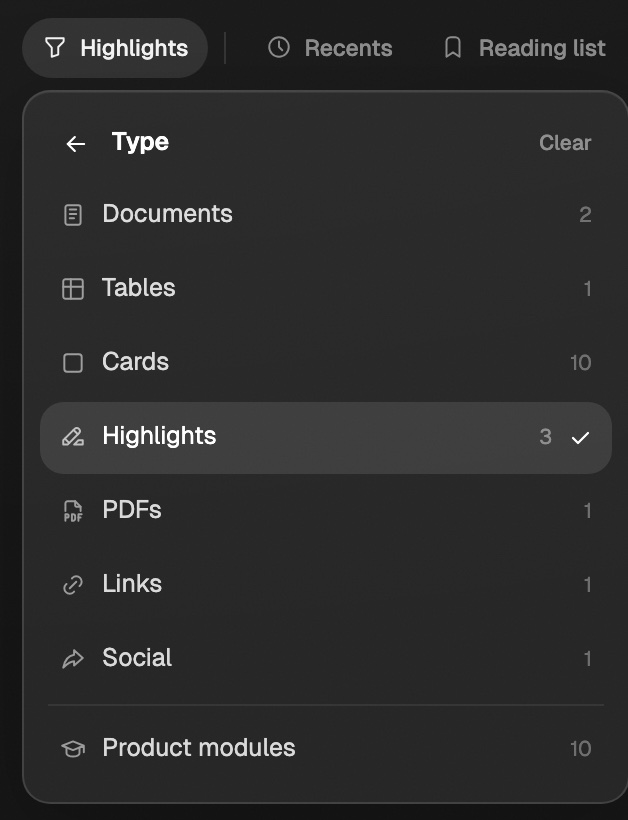
Click Filter, open Type, and click Highlights. This includes highlights you made in Eden's reader and imported ones.
The number next to Highlights is how many you have.
See highlights from one app
Click Filter, open Source, and pick Readwise, Kindle, or Snipd under Highlights. A highlights toolbar appears with more filters:
- Types, Tags, and Authors narrow the list.
- The sort menu offers Newest first, Oldest first, or Source A–Z.
Connect an app first: Readwise, Kindle, or Snipd.
Use your highlights
Select one or more highlights. The bar at the bottom has:
- Add to board to place them on a board.
- Chat with to ask Eden about them.

You can also right-click any highlight for the same actions.
Highlighting while you read
Select text in any Eden reader to save a highlight you can search, note, and put on a board.
Connecting Readwise to Eden
Sync your Readwise highlights into your Library, then search them, chat with them, and add them to boards.
Filtering and browsing your Library
Open a shelf like Tables or Docs, narrow your Library by type, source, date, topic, or tag, sort it, save views you reuse, and switch between Grid, List, and Sources.
Get answers from the team and other creators.
Ask in the Eden help channel, see how others use the app, and come to the live workshops. Free with any Eden account.
Join the Eden CommunityEmail us. A real person reads every message.
Tell us what you tried and where you got stuck. We answer within one business day.
[email protected]